Payment Calculator
Solve for any loan variable: payment, amount, term, or rate.
What is a payment calculator?
A payment calculator tells you how much you need to pay each period to clear a loan by a set date. Put in the loan amount, the interest rate and the term. You get your monthly payment, the total interest you will pay, and the total amount you will repay.
CalciHub's version goes one step further. You can also work backwards. Know the payment you can afford? Find out how much you can borrow. Know the amount and payment? Find out how long it will take. Each tab (Find Payment, Find Amount, Find Term, Find Rate) solves for a different unknown.
Quick answer: For a $20,000 loan at 6% annual interest over 60 months, the monthly payment is $386.66. You repay $23,199.36 in total, of which $3,199.36 is interest.
How to use the payment calculator
- Pick what you want to find. Choose Find Payment, Find Amount, Find Term or Find Rate.
- Enter the other values. Loan amount, annual interest rate and term in months. If your term is in years, multiply by 12 (5 years = 60 months).
- Choose your payment frequency. Monthly, biweekly or weekly.
- Click Calculate. You will see the result plus total repayment and total interest.
Tip: Try the same loan with three different terms before you sign anything. The monthly figure looks smaller on a longer loan, but the total interest usually grows a lot.
How the payment formula works
Most fixed-rate loans use the standard amortization formula:
PMT = P × r ÷ (1 − (1 + r)^−n)
- PMT = payment per period
- P = loan amount (principal)
- r = interest rate per period (annual rate ÷ 100 ÷ number of payments per year)
- n = total number of payments
The formula makes sure every payment is the same size, and that the balance reaches exactly zero on the last payment. In the early months, most of each payment goes to interest. Later, most of it goes to principal.
In Excel or Google Sheets, the same result comes from:
=PMT(rate/12, months, -loan_amount)
For example, =PMT(6%/12, 60, -20000) returns 386.66.
Worked example
Sara takes a $30,000 business equipment loan at 7.5% annual interest, repaid monthly over 4 years (48 months).
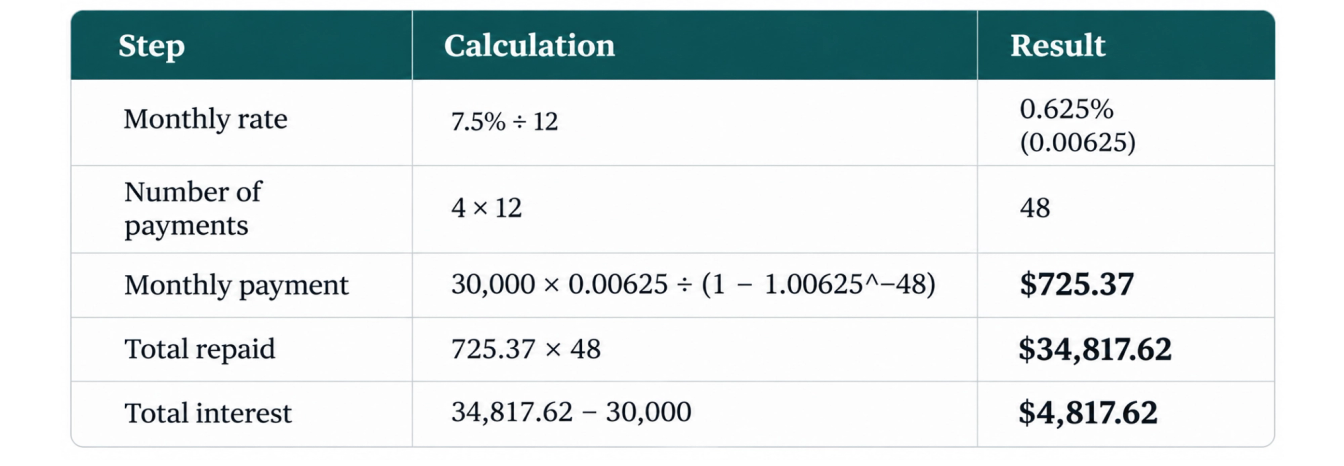
If Sara's budget can handle about $725 a month, she knows the loan costs her roughly $4,818 in interest. That is the number worth comparing against other offers, not just the monthly figure.
How term and rate change what you pay
Same loan amount, different terms. All figures below are for $25,000 at 9% annual interest, monthly payments:
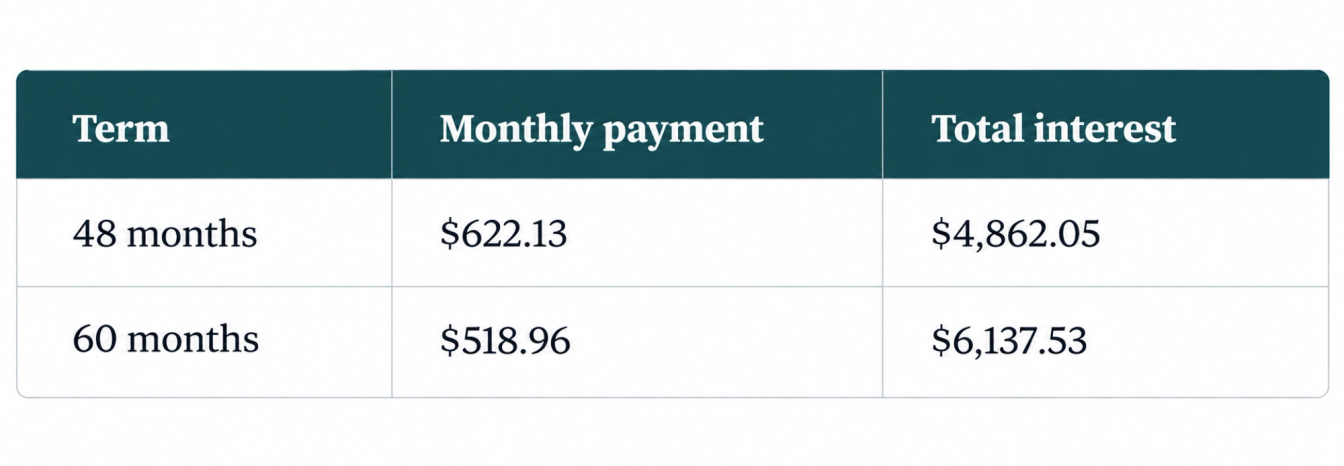
Stretching the loan by 12 months lowers the payment by about $103 a month but adds roughly $1,275 in interest. Whether that trade is worth it depends on your budget, not on a rule.
Ways to lower what you pay
- Choose a shorter term if the payment fits. Less time means less interest.
- Make one extra payment a year. On Sara's loan above, one extra payment a year clears the debt in about 45 months instead of 48 and saves several hundred dollars in interest.
- Pay biweekly, if your lender applies payments straight away. Half-payments every two weeks add up to 26 half-payments, which equals 13 full monthly payments a year. Check first that your lender does not hold the money until a full payment is reached, because then you gain nothing.
- Ask about prepayment penalties before you make extra payments.
- Compare offers by total interest and APR, not by the monthly figure alone.
Common mistakes when calculating loan payments
- Entering years instead of months. A 5-year loan is 60 months. Typing 5 gives a wildly wrong answer.
- Using APR as if it were a monthly rate. The calculator divides it for you. Enter the annual figure.
- Forgetting fees. Processing fees, insurance and taxes are not in a basic payment calculation. Add them separately.
- Using it for variable-rate loans. The result is only accurate while the rate stays the same.
- Ignoring the total cost. A low monthly payment can hide a high total interest bill.
Frequently Asked Questions
Multiply the loan amount by the monthly interest rate, then divide by 1 − (1 + rate)^−months. For $20,000 at 6% over 60 months, that gives $386.66 a month. The calculator does this for you in one click.
A loan calculator usually answers one question: what is my payment? A payment calculator lets you solve for any of the four variables: payment, amount, term or rate. Use it when you know your budget but not the loan size, or when you want to know how long a loan will take.
Only roughly. Leases include a residual value and a money factor, which a standard loan formula does not handle. You can use it to estimate a fixed-rate purchase loan for the same item and compare.
More frequent payments usually cut interest slightly, because the balance falls sooner. Weekly or biweekly payments also add up to extra payments over a year if you pay a full monthly amount split into halves. Confirm with your lender how they apply early payments.
This calculator assumes equal payments and a fixed rate. If your rate is variable, use the result as a starting estimate and recalculate whenever the rate changes, using your remaining balance and remaining months.
Before you rely on this result
Results are estimates based on the figures you enter. They exclude fees, taxes and inflation unless stated, and they assume the rate you supply holds for the whole period. For a decision that matters, confirm the numbers with the lender, provider or a qualified adviser.
Related Finance calculators
See all Finance →- Retirement CalculatorProject 401k/IRA savings growth to retirement with year-by-year table.
- ROI CalculatorCalculate Return on Investment and annualized ROI for any investment.
- Investment CalculatorFuture value of lump sum plus recurring monthly investments.
- Savings Goal CalculatorPlan how much to save monthly to reach your financial goal.
- Interest Rate CalculatorFind the interest rate given loan amount, payment, and term.
- Down Payment CalculatorPlan your home down payment savings goal and timeline.
More from Finance
View all posts →Longer reads from our finance collection.